Keep booking information connected
The clinic used Setmore for bookings and Halaxy for patient and appointment management. It needed a reliable way to transfer booking details, account for existing patients and handle appointment changes.
I am Chidiebele Onyia, a SaaS Implementation Manager who builds CRM workflows and integrations for customer onboarding.
Practical CRM, automation and SaaS implementation work: connecting clinic systems and building a structured customer onboarding process.
Explore Project 1 Explore Project 2 →Conceptual workflow · Anonymised client project
Connecting a clinic's booking and practice systems.
The clinic used Setmore for bookings and Halaxy for patient and appointment management. It needed a reliable way to transfer booking details, account for existing patients and handle appointment changes.
The clinic already used Setmore and Halaxy. I built the Zapier integration between them, then tested it and handed it over.
Each booking used to take more than five minutes to copy across by hand. With ten or more bookings a day, the integration removes around four hours of retyping a week.
Estimate based on 10 bookings × 5 minutes × 5 working days: 250 minutes, or just over four hours a week.
Clarify service and practitioner mapping, patient matching rules and the changes that the workflow needed to support.
Built the Zapier steps that link booking information with the relevant service and appointment details in Halaxy.
Use dummy bookings to inspect the resulting appointment and investigate differences between the two systems.
Project scope: build, test and hand over a Setmore → Zapier → Halaxy integration for the clinic’s existing accounts.
The core process links a booking to the right patient and appointment information.
Setmore supplies the customer, service, practitioner and appointment information.
The matching rule requires both email and telephone to match an existing Halaxy patient.
The workflow reuses a matching patient record or follows the patient-creation path.
Booking details are mapped to Halaxy, with references retained for subsequent updates.
A booking may belong to a patient already recorded in Halaxy. The client’s agreed matching rule used both email and telephone, helping the workflow determine when an existing record could be reused. A mismatch needs careful handling because contact details can change.
Rescheduling and cancellation were part of the requested workflow. Stored references connect an update to the relevant appointment. This case study does not claim that the separate Halaxy-to-Setmore availability sync is complete.
The customer’s name and contact details, service, practitioner, appointment date and time all need to map to the correct destination fields. Service and practitioner identifiers matter as well as their visible names.
A clean view of the four Zapier steps used in the booking workflow.
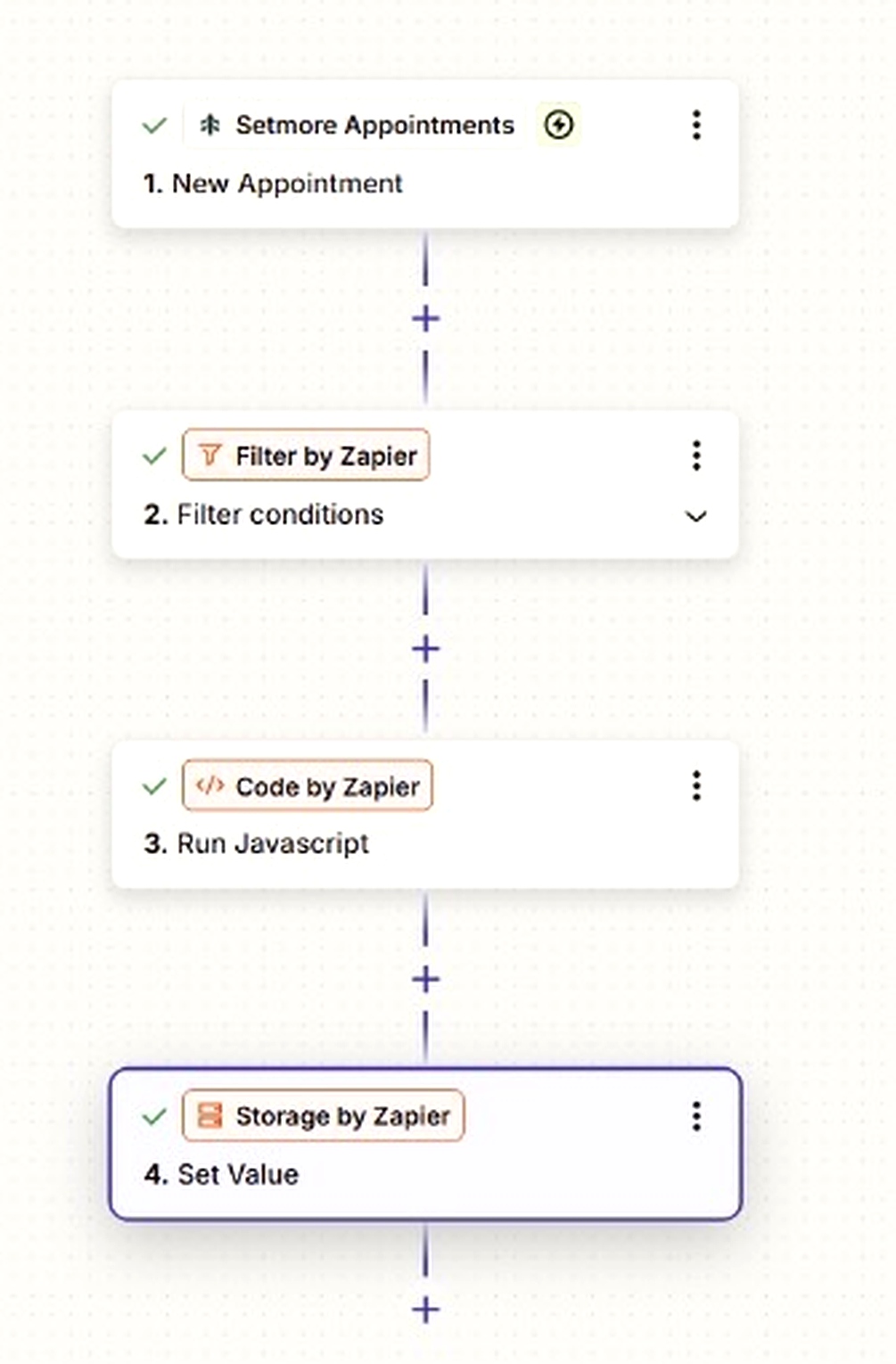
A connected account is the starting point. The practical check is whether the expected appointment reaches the right system.
A dummy Setmore booking was used to check the integration, and the resulting appointment was observed in Halaxy. Differences in the booking display were investigated as part of the work.
Temporary booking-hour changes used for testing were restored afterwards. This portfolio omits the clinic’s identity, patient information and account credentials.
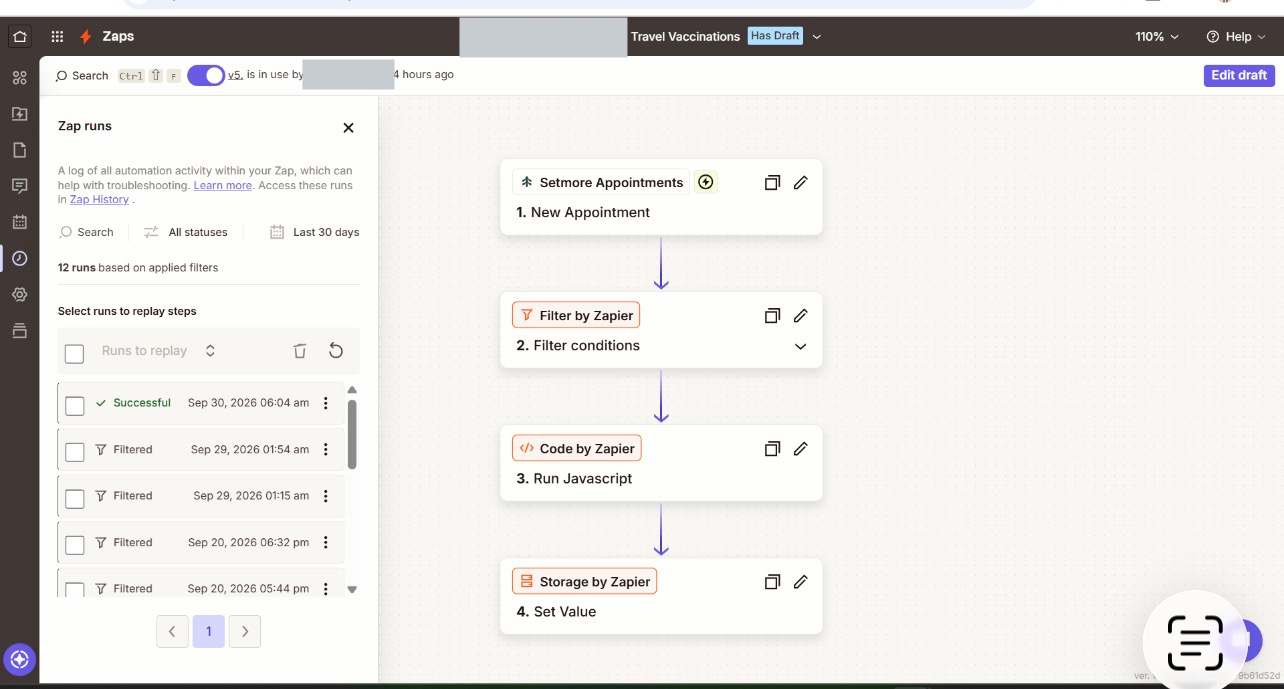
A test run completed successfully in Zapier.
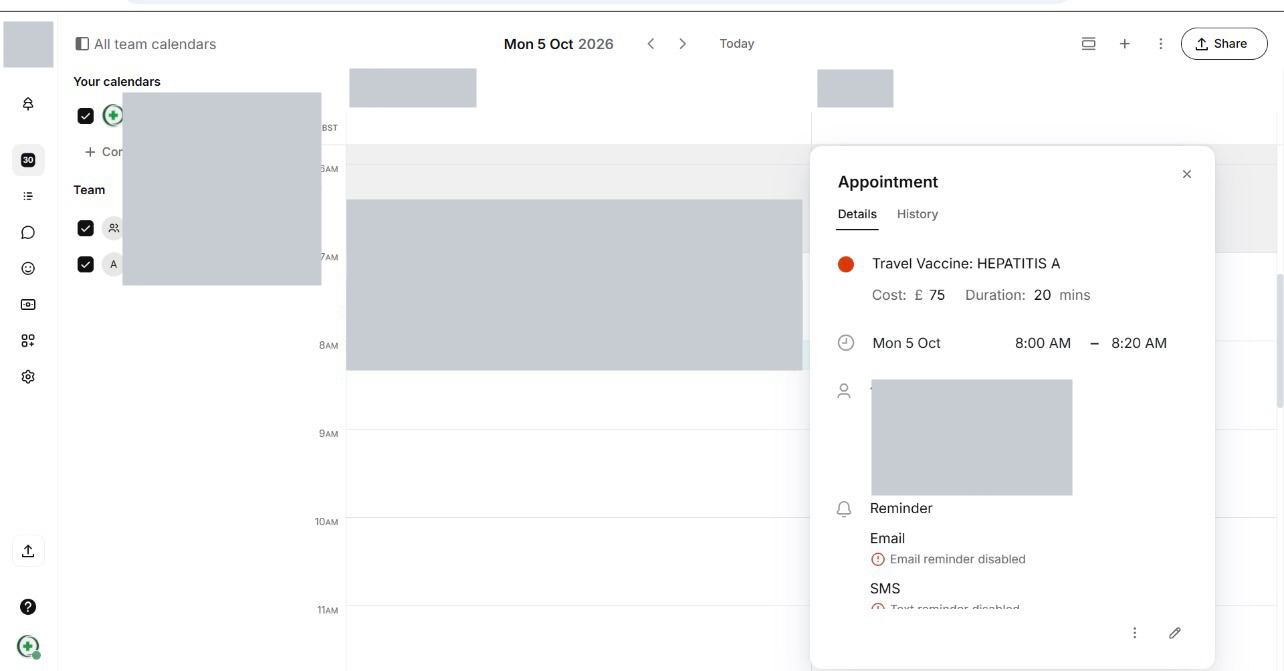
The test booking captured the service and appointment time.
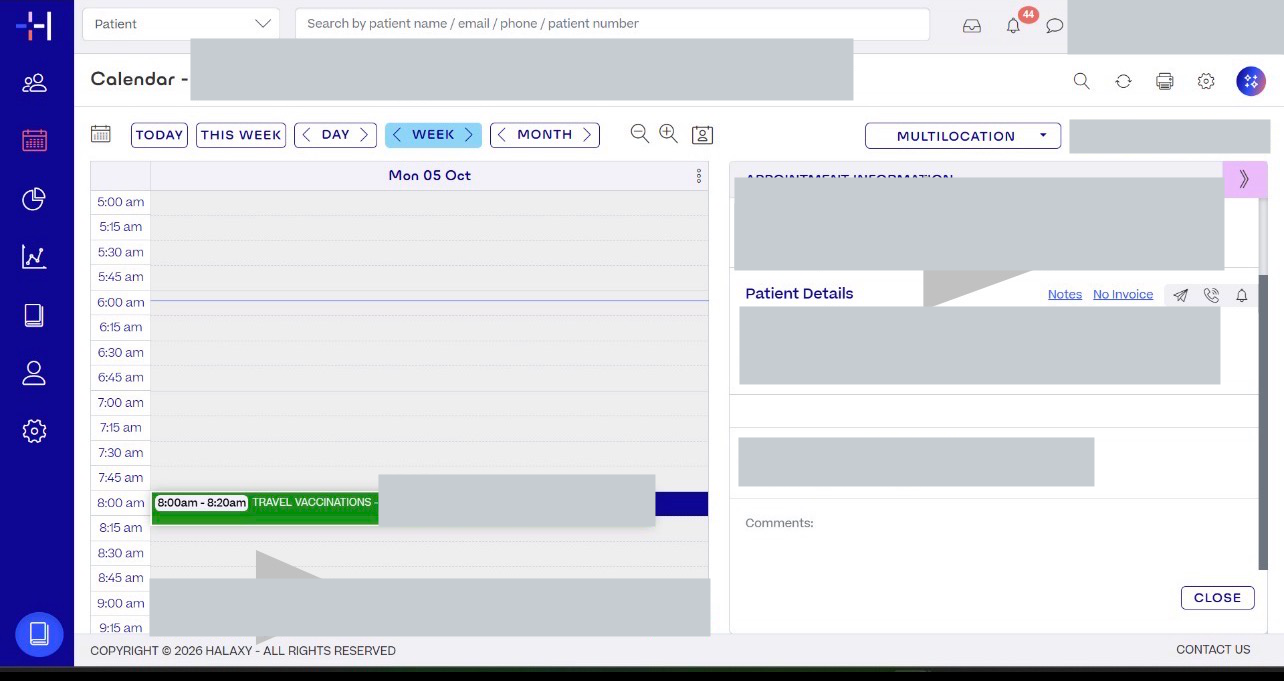
The corresponding appointment was observed in the clinical system.
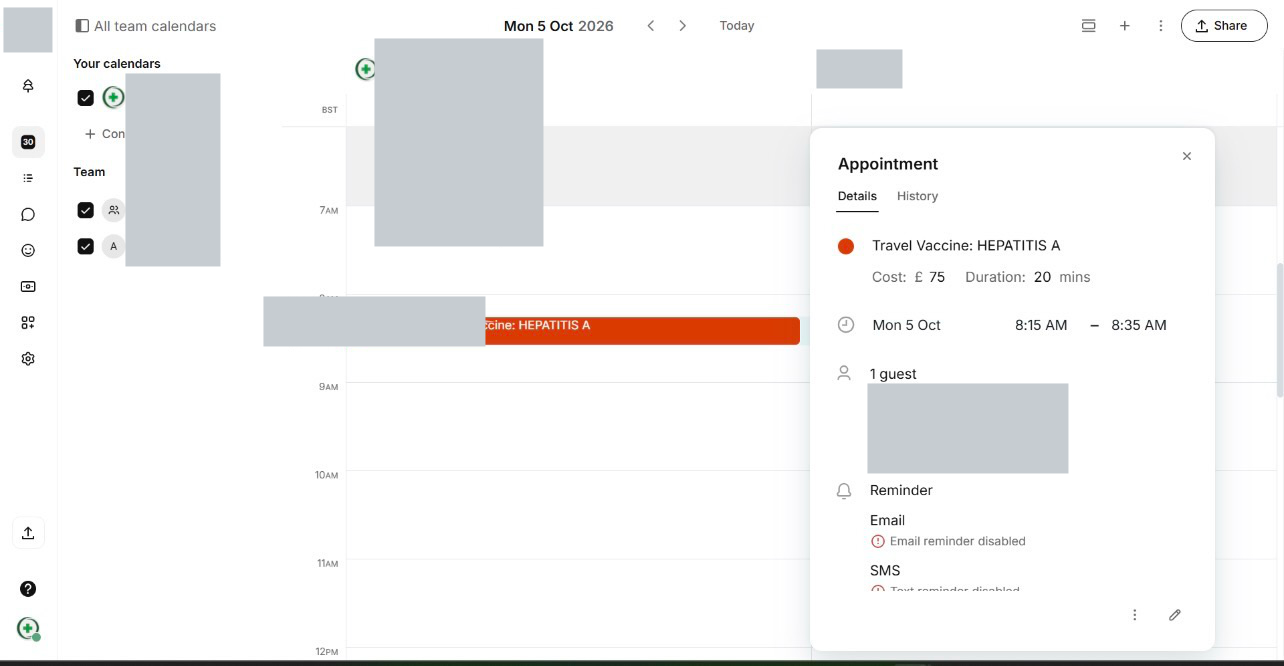
The dummy booking was moved to a new time in Setmore.
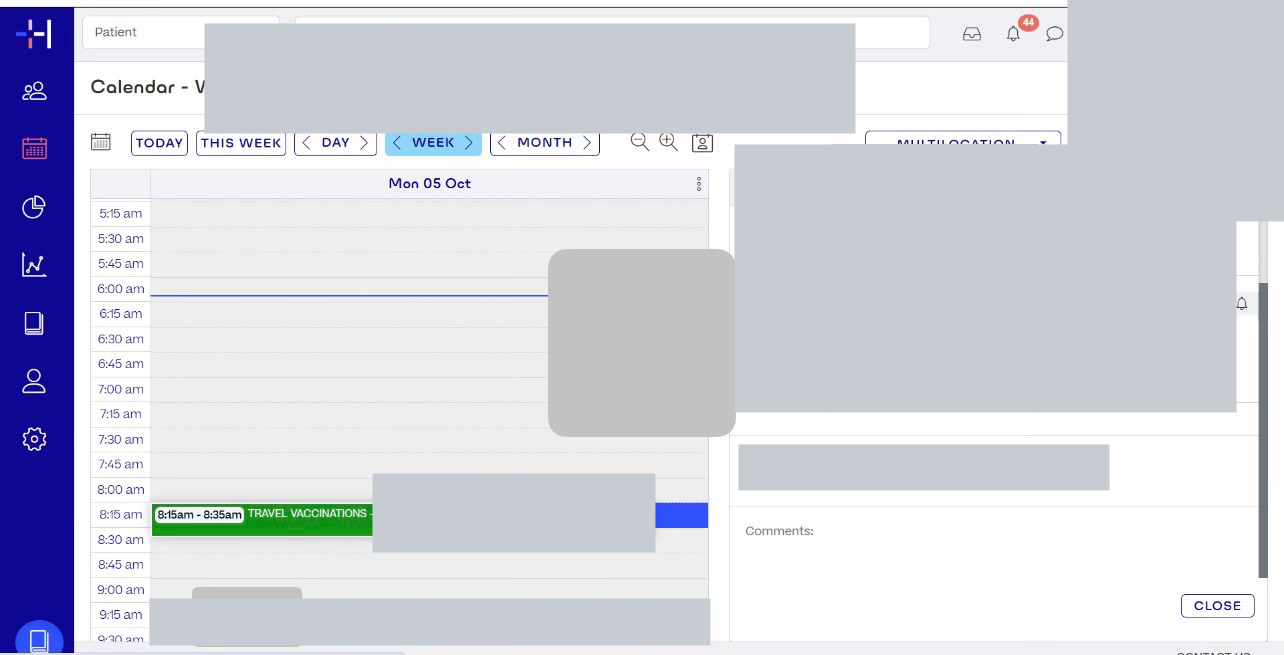
The updated time was visible in Halaxy.
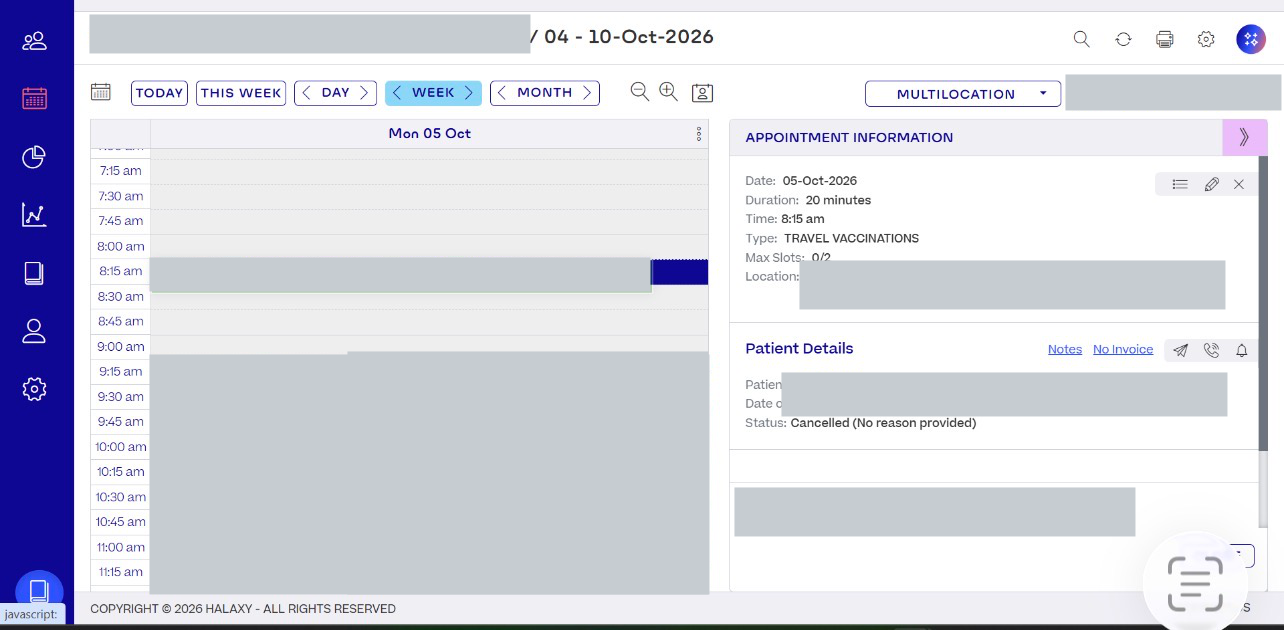
The test appointment displayed a Cancelled status in Halaxy.
The time-saving figure is an estimate based on the manual process and booking volume described above. Screenshots show test outcomes, are anonymised and are used with the client’s permission.
Turning client requirements into workflow configuration, then checking the result against the intended process.
SaaS Customer Onboarding,
CRM Automation & Customer Support
From customer handover to a tested onboarding workflow, documented support resolution and a visible implementation plan.
Northbridge Medical Clinic and practice manager Sarah Mitchell formed the main fictional customer scenario. Riverside Health Clinic was a separate simulated company used to test the HubSpot workflow.
CareFlow Cloud demonstrates the practical steps involved in onboarding a business customer: configuring CRM records, automating internal handover activities, handling a support request and tracking implementation progress.
A clinic onboarding to a SaaS platform needs coordinated account setup, clear implementation ownership, timely kickoff activities and an organised support process. Without that structure, tasks can be missed, progress can become unclear and access issues can delay implementation.
I carried out this project independently: configuring company and contact records, building and testing automation, assigning follow-up tasks, managing the support scenario, documenting troubleshooting and tracking acceptance criteria and outstanding work.
I configured Northbridge Medical Clinic’s company record with an account owner, Customer lifecycle stage, Medical Practice industry and associated practice manager contact. The record brings onboarding activities and implementation tasks together.
I built the company-based CareFlow Cloud | Customer Onboarding Kickoff Automation workflow. It responds when Onboarding Status changes to Handover Received.
I tested the workflow with Riverside Health Clinic. The logs show successful triggering, task creation, notification and workflow completion. I also verified receipt of the automated email.
Northbridge Medical Clinic’s company record shows the Customer lifecycle stage, Medical Practice industry, associated practice manager and assigned onboarding tasks.
Fresh screenshot requested: this existing capture retains its original overdue labels, dates and task statuses. It will be replaced after the current HubSpot record is reviewed.
The enabled company workflow responds to Handover Received, creates the kickoff task for the company owner and sends an internal notification.
The automation turns a handover status into a named next action for the company owner. The email provides an additional prompt to review the customer record and begin kickoff coordination.
The received HubSpot email confirms a new onboarding assignment and directs the owner to review the record, complete the kickoff task and arrange onboarding. The footer identifies its automated workflow.
The first view shows the test company in the log. The second view shows the result of each workflow step.
The log shows the workflow completing and the notification being sent for Riverside Health Clinic, the test company.
The action log records successful triggering, kickoff-task creation, internal notification and workflow completion.
Ticket #2 — Unable to access CareFlow Cloud account. I created the initial complaint as an agent-created simulation of a login problem for Sarah Mitchell at Northbridge Medical Clinic: unable to sign in despite attempting a password reset.
I reviewed the complaint and follow-up, recorded troubleshooting findings in internal notes, identified account activation as the issue and provided activation guidance. I then reviewed the confirmation, documented the outcome and marked the ticket Solved.
Ticket ownership, structured troubleshooting, clear written communication, internal documentation, customer follow-up and resolution tracking.
Follow the ticket from the initial scenario through investigation, confirmation and resolution.
An agent-created complaint models a practice manager unable to log in after trying a password reset.
Requester-side evidence requested: the current image shows an agent-created simulation. Replace it with a genuine incoming test submission from a separate requester email address.
An internal note records the activation issue and proposed checks: verify status, resend the invitation and confirm login before closure.
The follow-up message records successful access after the account activation steps.
The final internal note documents the issue, guidance and confirmation; the ticket header shows Solved.
The follow-up clarified the activation issue. The public response explained how to find the invitation, complete activation and request a replacement if the link was missing or expired.
The follow-up clarifies that the account has not been activated, giving the investigation a specific direction.
The public reply explains how to locate and use the activation invitation, with a next step if the link is missing or expired.
I created CareFlow Cloud | SaaS Customer Onboarding & Implementation with Product Backlog, Sprint To Do, In Progress and Done stages. Activities cover CRM setup, automation, support, requirements validation, customer account configuration and staff training.
I used task ownership, deadlines and acceptance-criteria checklists to organise work and verify deliverables. Completed checklists provide a clear distinction between tested outputs and activities still being planned.
I documented completed work, outstanding activities and next priorities. This was a solo, Scrum-inspired implementation exercise, not a formal Scrum ceremony involving a full project team.
Four stages separate backlog, sprint commitments, active work and completed items. CRM configuration (3/3), onboarding automation (3/3) and support resolution (4/4) have completed checklists; the progress-review card is also in Done.
All three automation criteria are checked: the handover trigger, automatic kickoff-task creation and assignment, and successful internal notification.
The progress review distinguishes completed CRM, automation and support activities from requirements validation in progress, planned account configuration and training, and future reporting improvements.
The evidence shows practical delivery across CRM, support and implementation coordination. Some onboarding activities are still in progress, as shown below.
Company and associated contact records established for the fictional customer.
Company-based handover automation built and switched on.
Successful task creation and internal email notification shown in test logs; email receipt evidenced.
The support scenario documented through confirmation and Solved status.
CRM configuration, onboarding automation and support resolution tracked with completed acceptance checklists.
Requirements, user-account setup, staff training and reporting remain separately tracked.
In progress: onboarding requirements validation.
Planned: customer user-account configuration and staff training.
Future backlog: customer onboarding progress reporting.
In a live implementation, I would track these three measures to check that the onboarding process is working.
How many working days pass between the Handover Received status and the kickoff meeting. The automation is designed to shorten this.
The share of invited customer users who activate their accounts within the first week. Activation problems were the cause of the support ticket in this project.
How long access and setup tickets stay open during onboarding, and how many customers need to raise one.
Evidence handling: screenshots are cropped to relevant software content, personal identifiers are permanently covered in the image pixels, and metadata is removed. Fictional scenario names and original workflow results are retained. Select any screenshot to inspect it at a larger size.
Contact Chidiebele Onyia about customer success, CRM automation or SaaS implementation opportunities.
Email Chidiebele